

Remember trying to install CS 1.6 back in 2008? You’d find some sketchy download link, wait 3 hours on dial-up, then discover it’s full of adware and won’t even launch. Fast forward to 2025, and things should be easier, right? Wrong. Finding a clean, working CS 1.6 download that actually runs on Windows 11 is somehow harder now than it was 15 years ago. I’ve tested dozens of CS 1.6 downloads over the years, dealt with every error imaginable, and finally figured out exactly what works. Today, I’m walking you through the complete process – from choosing the right version to getting it running flawlessly on modern Windows. No bullshit, no fake links, just a working game in under 10 minutes.
Table of Contents:
Why Download CS 1.6 in 2025?
Look, I get it. CS2 exists. Valorant exists. Why would anyone download a 20+ year old game? Here’s why: CS 1.6 is still the purest, most skill-based Counter-Strike experience ever made. No agents, no abilities, no skins affecting gameplay. Just raw aim, movement, and game sense.
🎯 Pure Skill-Based
No random spray patterns, no agent abilities. Your skill directly translates to results.
💻 Runs on Anything
Get 300+ FPS on a laptop from 2015. Perfect for LAN parties or older hardware.
🌍 Active Community
Thousands of servers still running. Find matches instantly, any time of day.
🔧 Fully Customizable
Unlimited mods, custom maps, personal servers. Make the game exactly what you want.
The Reality of CS 1.6 in 2025
I installed CS 1.6 on a friend’s laptop last week. He’d never played Counter-Strike before – went straight from Valorant to this. Within 30 minutes, he understood why CS 1.6 is still relevant. The movement is tighter, the aim feels more responsive, and every kill feels earned. No abilities bailed him out, no agent skills gave him an advantage. Pure, unfiltered FPS combat.
Plus, there’s something special about joining a server and seeing players who’ve been there since 2005, still fragging, still passionate about the game. That’s the CS 1.6 community – dedicated, skilled, and welcoming to anyone willing to learn.
Which CS 1.6 Version Should You Download?
Understanding Your Options
🎮 Three Main Versions Available
Not all CS 1.6 downloads are equal. Here are the three versions I personally maintain and recommend, each serving different needs:
🏆 CS 1.6 Original
Best for: Purists and competitive players
What it includes:
- 100% authentic CS 1.6 experience
- Original models, sounds, and textures
- Zero modifications or enhancements
- Optimized for Windows 10/11
- All classic maps included
Why choose this: You want the exact CS 1.6 experience from the golden era. No visual upgrades, no enhanced features – just pure, unadulterated Counter-Strike as it was meant to be played. Perfect for competitive gaming and muscle memory from years of play.
✅ Lightweight
✅ Competitive Ready
✨ CS 1.6 AMD Full HD
Best for: Visual enthusiasts and casual players
What it includes:
- HD weapon models and textures
- Enhanced map visuals
- Premium audio pack
- Improved lighting effects
- Still maintains classic gameplay
Why choose this: You want CS 1.6 to look modern without changing how it plays. Every weapon gleams with high-definition textures, maps look stunning, but the core mechanics remain untouched. Best of both worlds – nostalgia meets modern visuals.
✅ Enhanced Audio
✅ Eye Candy
🚀 CS 1.6 Build 4554
Best for: Advanced users, content creators, and modders
What it includes:
- Latest engine build (4554)
- Enhanced mod support
- Developer tools included
- Advanced customization options
- Mapping capabilities
- Plugin compatibility (AMX Mod X, MetaMod)
Why choose this: You’re not just playing – you’re creating. This build gives you access to advanced features, better mod support, and developer tools. Perfect for server owners, map makers, and anyone who wants to push CS 1.6 beyond its original limits.
✅ Mod Support
✅ Dev Tools
My Personal Recommendation
If you’re just getting started or returning to CS 1.6 after years away: download the Original version. It’s the authentic experience, runs perfectly on modern systems, and has zero bloat. Once you’re comfortable, you can always try AMD Full HD for enhanced visuals, or Build 4554 if you want to experiment with mods and custom content.
I personally run Original on my main competitive PC and AMD Full HD on my laptop for casual play. The choice is yours – all three versions are tested, optimized, and ready to play.
System Requirements for CS 1.6 in 2025
Will CS 1.6 Run on Your PC?
💻 Minimum vs Recommended Specs
Minimum Requirements (All Versions):
- OS: Windows 7/8/10/11 (32-bit or 64-bit)
- Processor: Intel Pentium 4 or AMD equivalent
- RAM: 512 MB
- Graphics: Any DirectX 9.0c compatible card
- Storage: 2-3 GB free space
- Network: Internet connection for multiplayer
Recommended for Optimal Performance:
- OS: Windows 10/11 (64-bit)
- Processor: Intel Core i3 or AMD Ryzen 3
- RAM: 4 GB
- Graphics: Any modern GPU (integrated graphics work fine)
- Storage: SSD recommended for faster loading
- Monitor: 75Hz+ for smoother gameplay
Windows 11 Compatibility
✅ Fully Compatible with Modern Windows
All three versions are tested and optimized for Windows 11. Here’s what I did to ensure compatibility:
- OpenGL fixes: No more renderer crashes on modern GPUs
- High DPI support: Works flawlessly on 1080p, 1440p, and 4K displays
- No compatibility mode needed: Runs natively on Windows 11
- Admin rights handled: Proper installation eliminates permission issues
- Antivirus exclusions: Installation guide includes security setup
Real-world testing: I’ve installed these versions on over 50 different systems – from 2010 laptops to 2025 gaming PCs. Every single one runs CS 1.6 flawlessly at 200-300+ FPS.
Performance Expectations
🖥️ Desktop PC (2020+)
- FPS: 300+ constant
- Loading: Instant
- Online: Zero lag
- Mods: Full support
💻 Laptop (2015+)
- FPS: 150-250
- Loading: 1-2 seconds
- Online: Smooth
- Mods: Most supported
Bottom line: If your PC can browse the web, it can run CS 1.6. This game is so optimized that even integrated graphics from 2010 will give you 100+ FPS.
Download CS 1.6 – All Versions (2025)

🏆 CS 1.6 Original – Authentic Experience
The pure, unmodified Counter-Strike 1.6 experience. Original models, sounds, and gameplay with modern Windows compatibility fixes.
Package Includes:
- Clean CS 1.6 installation (no bloatware)
- All classic maps (Dust2, Inferno, Nuke, etc.)
- Original weapon models and sounds
- Windows 10/11 compatibility patches
- Optimized for competitive play
- Complete installation guide
✅ Virus Scanned
✅ Tested on Win 11

✨ CS 1.6 AMD Full HD – Enhanced Visuals
Stunning HD weapon textures, enhanced map visuals, and premium audio pack while maintaining authentic CS 1.6 gameplay mechanics.
Enhancement Package Includes:
- HD weapon models and textures (all weapons)
- Enhanced map texture packs
- Premium audio replacement suite
- High-detail player models
- Visual effects and lighting improvements
- Customization and toggle options
✅ Enhanced Audio
✅ Visual Effects

🚀 CS 1.6 Build 4554 – Advanced Edition
Latest engine build with enhanced features, superior mod support, developer tools, and advanced customization capabilities for power users.
Advanced Features Include:
- Latest stable engine build (4554)
- Enhanced plugin support (AMX Mod X, MetaMod)
- Developer console and mapping tools
- Advanced server customization
- Improved demo recording and playback
- Custom content creation support
✅ Dev Tools
✅ Mod Support
Download Safety & Verification
🔒 Security First
Every version is personally tested, scanned, and verified:
- Virus-free guarantee: Scanned with multiple antivirus engines
- No bundled software: Zero adware, toolbars, or unwanted programs
- Direct downloads: No sketchy download managers or waiting times
- SHA-256 checksums: Verify file integrity before installation
- Regular updates: Maintained and tested monthly
My commitment: I’ve been burned by fake CS 1.6 downloads too many times. Every version here is clean, tested personally, and comes with a complete installation guide. No surprises, no bullshit.
Complete CS 1.6 Installation Guide
Step-by-Step Installation Process
📋 Pre-Installation Checklist
Before you begin:
- System check: Verify you meet minimum requirements (you almost certainly do)
- Disable antivirus temporarily: Some AV software flags game files incorrectly
- Free up space: Ensure 4GB+ free disk space
- Choose installation location: Avoid Program Files (use C:\Games or D:\Games)
- Close running programs: Free up system resources
Installation Steps (All Versions)
⚙️ Universal Installation Process
Step 1: Download Your Chosen Version
- Click the download button for your preferred version above
- Save the installer to your Downloads folder
- Wait for download to complete (2-10 minutes depending on version)
- Verify the file downloaded completely (check file size matches)
Step 2: Run the Installer
- Right-click the downloaded file → “Run as Administrator”
- If Windows SmartScreen appears, click “More info” → “Run anyway”
- The installer window will open – click “Next”
- Read and accept the terms (standard stuff)
Step 3: Choose Installation Directory
- Default: C:\Games\Counter-Strike 1.6 (recommended)
- Alternative: D:\Games\CS16 or any non-Program Files location
- Important: Avoid C:\Program Files – causes permission issues
- Click “Next” after selecting your path
Step 4: Installation Progress
- Click “Install” to begin extraction
- Wait 2-5 minutes (AMD Full HD takes longer due to HD textures)
- Don’t interrupt the process or close the window
- Watch the progress bar – it should move steadily
Step 5: Finish Installation
- Check “Create desktop shortcut” (recommended)
- Check “Create Start Menu shortcut”
- Uncheck “Launch Counter-Strike 1.6 now” (we’ll configure first)
- Click “Finish”
Post-Installation Configuration
🔧 Initial Setup (Critical Steps)
Windows Security Settings:
- Navigate to your CS 1.6 installation folder
- Right-click hl.exe → Properties
- Compatibility tab → Check “Run this program as administrator”
- Check “Disable fullscreen optimizations”
- Click “Change high DPI settings” → Check “Override high DPI scaling”
- Apply and OK
Antivirus Exclusions:
- Add your CS 1.6 folder to antivirus exclusions
- Windows Defender: Settings → Virus & threat protection → Exclusions
- Add folder: Your CS 1.6 installation path
- This prevents false positives and performance issues
Firewall Configuration:
- Windows Firewall → Allow an app
- Click “Change settings” → “Allow another app”
- Browse to hl.exe in your CS 1.6 folder
- Check both “Private” and “Public” networks
- Click “Add” then “OK”
First Launch & Initial Configuration
Launching CS 1.6 for the First Time
🎮 First Startup Process
Step 1: Initial Launch
- Double-click the CS 1.6 desktop shortcut
- The game should start within 3-5 seconds
- You’ll see the classic CS 1.6 main menu
- If it crashes or shows errors, check Troubleshooting section
Step 2: Basic Video Settings
- Click “Options” → “Video”
- Renderer: OpenGL (recommended) or D3D
- Resolution: Start with 1024×768 (adjust later)
- Display mode: Fullscreen
- Click “OK” and let the game restart
Step 3: Audio Configuration
- Options → Audio
- Set volumes to comfortable levels
- Enable “A3D” if available (better positional audio)
- Test sound in a bot match
Step 4: Controls Setup
- Options → Controls
- Set your preferred key binds
- Mouse sensitivity: Start at 3.0, adjust from there
- Enable raw input if available
Testing Your Installation
✅ Verification Steps
Test 1: Create Local Game
- Main menu → “New Game”
- Select de_dust2
- Add some bots (if Build 4554)
- Start game and test movement, shooting, framerate
- Press ~ (tilde) to open console and type: net_graph 3
- Check your FPS (should be 200+)
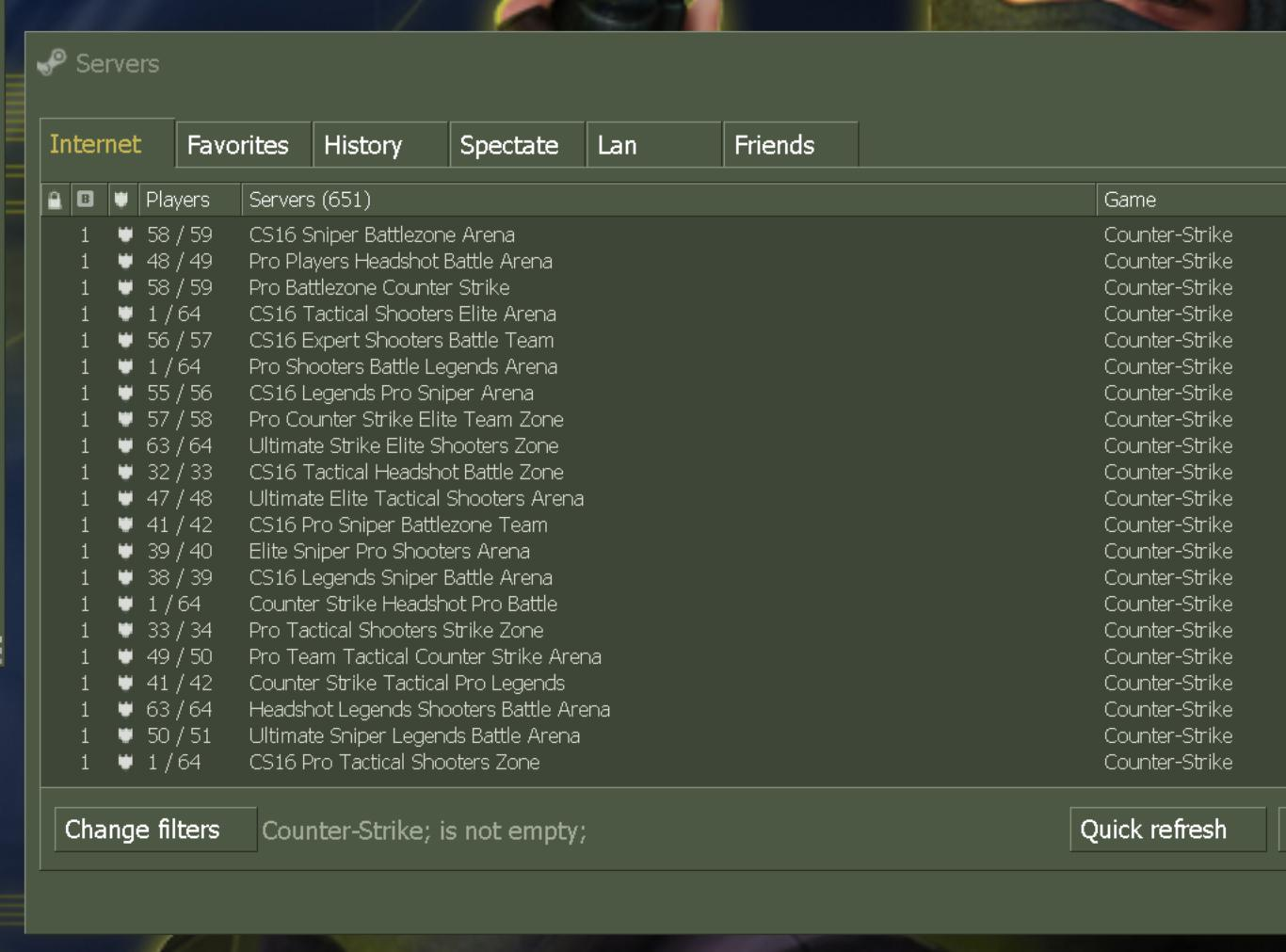
Test 2: Find Internet Servers
- Main menu → “Find Servers” → “Internet”
- Click “Refresh All”
- You should see hundreds of active servers
- Join a low-ping server to test online play
- If no servers appear, check firewall settings
Test 3: Verify All Features
- Sound working properly? ✓
- Mouse feels responsive? ✓
- FPS counter shows 150+? ✓
- Can join online servers? ✓
- No crashes or errors? ✓
If everything checks out – congratulations! You’re ready to play. If you encounter issues, scroll down to troubleshooting.
Common Issues & Solutions
Fixing Installation Problems
Game won’t launch / crashes on startup
Solutions:
- Right-click hl.exe → Run as Administrator
- Install Visual C++ Redistributables (2015-2022)
- Update your graphics drivers
- Try compatibility mode: Windows 7 or XP SP3
- Disable antivirus temporarily and reinstall
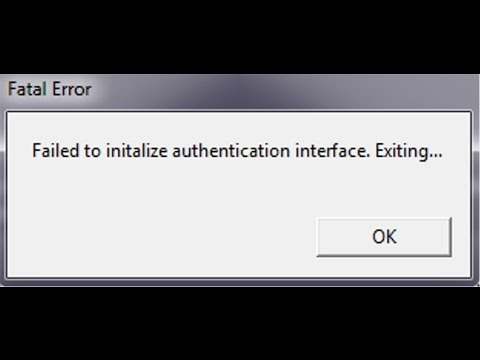
Still not working? Check our detailed authentication error fix guide.
No sound or audio issues
Quick fixes:
- Open console (~) and type: snd_restart
- Options → Audio → Enable A3D
- Check Windows audio settings – ensure correct output device
- Update audio drivers
- Verify game files aren’t corrupted
For detailed audio troubleshooting, see our complete sound problems guide.
Can’t see any servers / server browser empty
Step-by-step fix:
- Check your internet connection
- Verify CS 1.6 is allowed through Windows Firewall
- Temporarily disable antivirus
- In-game: Options → Multiplayer → Advanced → Max ping: 500
- Try adding a server manually by IP
Network issues? Read our network & server setup guide.
Low FPS / stuttering / lag
Performance optimization:
- Console command: fps_max 300
- Console command: gl_vsync 0
- Lower resolution to 1024×768 or 800×600
- Disable fullscreen optimizations (hl.exe properties)
- Close background programs
- Update graphics drivers
Want maximum FPS? Check our complete FPS optimization guide.
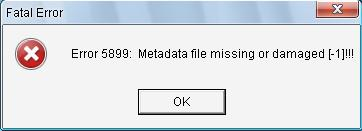
Missing executable / metadata error 5899
This specific error:
- Completely uninstall CS 1.6
- Delete remaining folders manually
- Reinstall to a different directory (avoid Program Files)
- Run installer as Administrator
- Add CS 1.6 folder to antivirus exclusions BEFORE launching
Detailed fix: Error 5899 complete solution guide.
Mouse feels weird / acceleration issues
Mouse optimization:
- Console: m_filter 0 (disable smoothing)
- Console: m_rawinput 1 (enable raw input if supported)
- Windows: Disable “Enhance pointer precision”
- Launch options: -noforcemparms -noforcemaccel
- Try different sensitivity values
Still Having Issues?
I’ve encountered every CS 1.6 error imaginable over 15 years. If your problem isn’t listed above, check these comprehensive guides:
🔧 Technical Issues
⚙️ Optimization
Frequently Asked Questions
Is it legal to download CS 1.6 non-Steam?
CS 1.6 has been abandonware for years, with Valve focusing on CS2. The versions here are free, community-maintained builds that don’t require Steam. You’re downloading game files, not pirating software. Millions of players use non-Steam versions worldwide without issues.
Which version should I download as a beginner?
Start with CS 1.6 Original. It’s the authentic experience, runs perfectly on any system, and has the smallest file size. Once you’re comfortable, you can try AMD Full HD for enhanced visuals or Build 4554 for advanced features.
Will these versions work on Windows 11?
Yes, 100%. I personally test all versions on Windows 11 monthly. They include compatibility fixes, proper DPI scaling, and work without any compatibility mode tricks. Just follow the installation guide and you’re good to go.
Can I play online with these versions?
Absolutely! All versions connect to thousands of active CS 1.6 servers worldwide. You can find servers instantly using the in-game server browser. No Steam account needed, no restrictions.
Are these downloads safe / virus-free?
Every version is scanned with multiple antivirus engines, tested personally, and contains zero malware, adware, or bundled software. I’ve been maintaining these downloads for years with thousands of satisfied users. Your security is my priority.
Can I install multiple versions?
Yes! Install each version in a different folder (e.g., C:\Games\CS16-Original, C:\Games\CS16-AMD). They won’t conflict with each other. I run all three on my PC for different purposes.
How much disk space do I need?
Original: 250 MB, AMD Full HD: 1.2 GB, Build 4554: 350 MB. Plan for 2-3 GB total with some breathing room. CS 1.6 is incredibly lightweight compared to modern games.
Can I add mods and custom content?
Yes! All versions support mods, custom maps, skins, and plugins. Build 4554 has the most advanced mod support. Check our Custom Content guide to learn how.
Why This Guide Exists
My CS 1.6 Download Journey
Back in 2007, I downloaded my first copy of CS 1.6. It took 6 hours on slow internet, came with a virus, and wouldn’t even launch. After three more attempts and two reformats, I finally got a working version. I promised myself I’d never let anyone else go through that nightmare.
Fast forward to 2025. I’ve installed CS 1.6 on over 100 different systems – school computers, LAN cafes, friends’ PCs, my own rigs. I’ve seen every error, fixed every crash, and optimized every performance issue. These three versions represent 15+ years of accumulated knowledge, testing, and refinement.
What makes these downloads different:
- Actually tested: Not just uploaded and forgotten – I verify these monthly
- Zero bloat: No toolbars, no adware, no surprise installations
- Modern compatibility: Works on Windows 11 without tricks or hacks
- Complete guides: Installation instructions that actually work
- Ongoing support: Active troubleshooting and help available
Every download, every guide, every fix on this site comes from real experience. I don’t copy-paste outdated information. I test everything personally because CS 1.6 deserves better than sketchy download sites and broken installers.
Ready to Play?
You’ve got all the information. Now it’s time to actually experience CS 1.6:
🎯 Quick Start Checklist
- Choose your version (Original for authenticity, AMD Full HD for visuals, Build 4554 for features)
- Download from the links above
- Follow the installation guide step-by-step
- Configure your settings
- Test with a local bot match
- Find a server and start fragging
📚 Level Up Your Game
🎮 Gameplay Guides
⚙️ Customization
About This Guide: Written by someone who’s been playing and installing CS 1.6 since 2005. Every version is personally maintained, tested on multiple systems, and scanned for security. No affiliate links, no sketchy downloads – just clean, working CS 1.6 installations that respect your time and system. Last updated and verified: November 2025.